FlutterFlow 7.2 moves your projects to Flutter 3.47.1 and replaces Firebase Dynamic Links with FlutterFlow Dynamic Links. Test Mode gets a Logs panel that can send layout overflows to the AI Agent, and built-in widgets get an Additional Flutter Properties section. In total, this release includes 14 features and improvements and 29 bug fixes.
Features and improvements
Flutter upgrade
Flutter 3.47.1: Build and preview your projects with Flutter 3.47.1 and Swift Package Manager support. Minimum platform versions are Android API 24, iOS 15, and macOS 12.
Dynamic Links
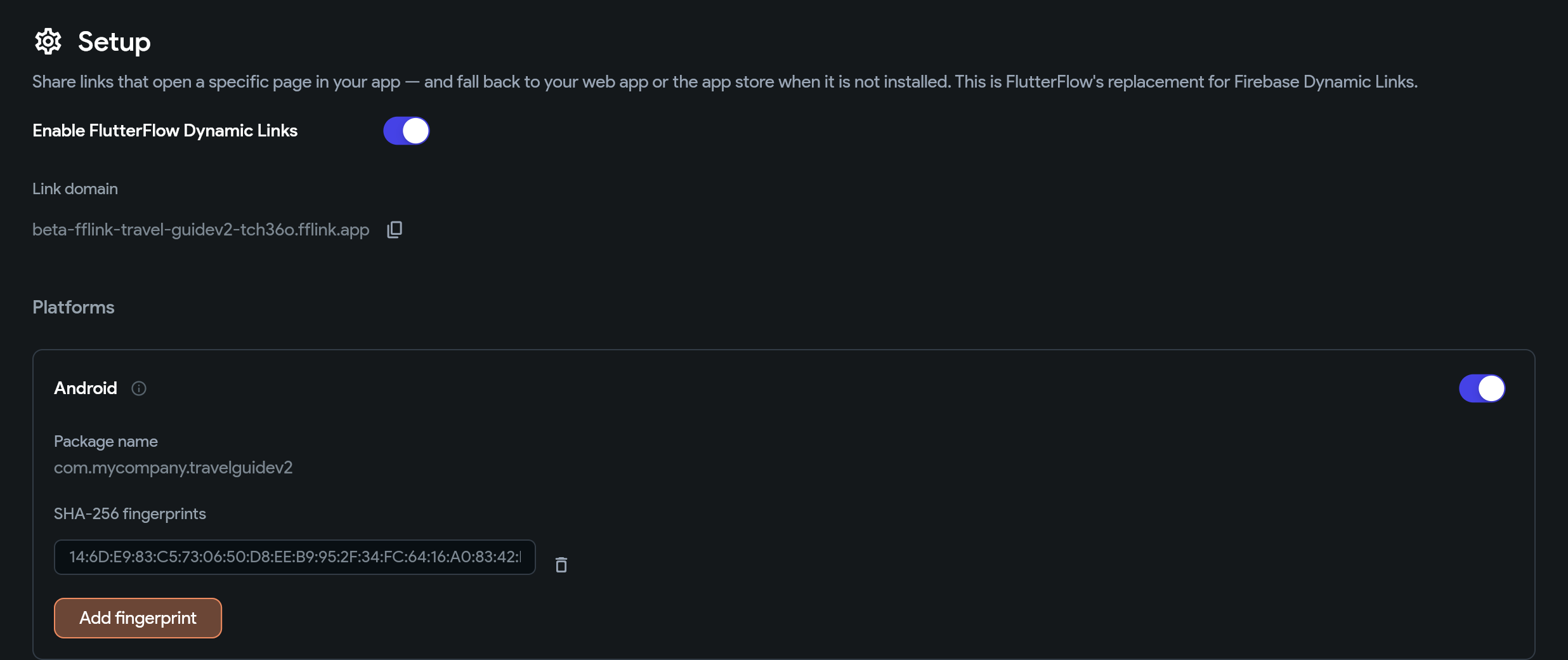
FlutterFlow Dynamic Links: Create short links that open your app to a specific page and fall back to the app store or your web app. Track link opens in the Analytics tab. FlutterFlow Dynamic Links replace Firebase Dynamic Links.
Turn on FlutterFlow Dynamic Links and set up each platform in App Settings.
Test Mode
Logs panel: A panel at the bottom of the builder shows your running app's output. Search the logs and filter them by severity. When a layout overflows, click Fix with AI to send the widget and a screenshot of it to the AI Agent.
Widgets and actions
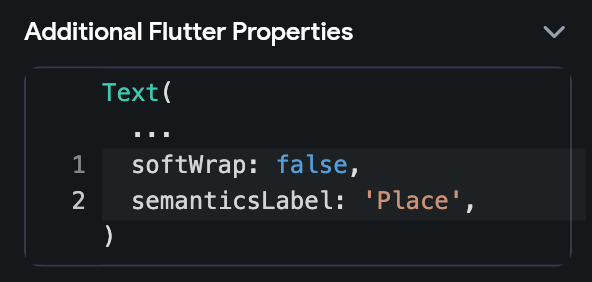
Additional Flutter Properties: Set Flutter parameters that the properties panel doesn't expose, as named Dart arguments with autocomplete and validation. The values apply in generated code and in Test Mode.
Add named Flutter arguments that the properties panel doesn't expose.
Keep Page State Alive: Turn on Keep Page State Alive for a PageView so each page keeps its state when you swipe away, instead of resetting or reloading its data when you swipe back.
Date Entry Mode: Use the Date Entry Mode option on the Date/Time Picker action to hide the pencil icon so users pick dates from the calendar only, or to let users type the date.
Custom code and libraries
Shareable custom code links: The browser URL points at the custom function, action, widget, code file, or configuration file that you have open. To share a link to it, copy the URL from the address bar.
Library prereleases: Publish a prerelease version of a library from a branch, so other projects can test in-progress library work before you merge it to main or release it.
Custom pub dependency sources: In the Add Dependency dialog, enter a custom Git or local path source instead of searching pub.dev.
Branching
Merge file tree: Use Expand All and Collapse All in the branch merge file tree.
Faster merge edits: Visual edits in Edit Project mode during a branch merge or commit revert are faster on large projects.
AI Agent
Native config files: AI agents can edit native config files, such as AndroidManifest.xml, Info.plist, and Podfile, through hooks and variables. Unlocking or relocking a file always asks for your approval. On the Free plan, agents can't start customizing a native config file, which matches the editor; files that are already customized stay editable.
Pinned projects: AI agents work on projects pinned to the latest stable FlutterFlow version. To use an agent on a project pinned to an older version or to the next stable release, re-pin or unpin the project first.
Long Codex conversations: Long Codex conversations in the AI Agent panel reopen faster.
Bug fixes
Builds after the Flutter upgrade
Android builds: Apps that use WebView, or plugins that request an old Kotlin language version, build again.
RevenueCat on iOS: Apps with RevenueCat build on the latest Xcode.
Custom Firebase versions: Apple builds stay compatible with custom Firebase package versions.
RepeatMode page parameters: Page parameters that use a custom RepeatMode enum compile with Flutter 3.47.
Google Maps manifests: Android manifests are valid while the Google Maps API key is still a placeholder.
SQLite databases: If your SQLite database file can't be loaded, the build fails with a clear message instead of producing an app that crashes on startup.
Custom code validation: Custom code validation results from before the upgrade are marked as outdated.
Generated code
Action block rebuilds: Page and component action blocks redraw the page when an update or Rebuild action asks them to, so loading indicators appear right away. Rebuild Containing Page also works on a page's own widgets.
Escaped request bodies: With Escape Variables in Request Body turned on, line breaks and other control characters are escaped correctly, so API calls send valid JSON.
Null API variables: API calls no longer send null variables as the string null.
Secure persisted app state: Booleans keep their true default values on first launch, and text lists stay exactly as saved, so "007" stays "007".
List fields in sets and map keys: Data types and documents with list fields work correctly in sets and as map keys, so equal values are treated as equal.
Downloaded test file: The test file in downloaded code passes flutter test and explains how to add your own tests.
WebView on web: Stack widgets placed above a WebView are clickable on web.
Editor, data, and libraries
Library Firestore collections: Firestore collections imported from a library appear in the Collections view on first load and no longer raise false "same name" errors that blocked Test Mode.
Nested library types: Enums and data types that come from a library's own library show their real names instead of "Unknown".
Translate All: Translate All respects languages that are locked on individual pages and components, and translates the unlocked ones.
Closed parent branches: A branch whose parent branch is closed says so, instead of showing "Missing permission to merge".
Moving queries: You can move a backend query into a widget that repeats its children.
Clear Text Fields: The Clear Text Fields settings no longer render blank.
Linking sign-in methods: If you choose the wrong account while linking sign-in methods, you stay signed out and get guidance to choose the correct account.
Desktop Test Mode preview: Clicks in the desktop Test Mode preview land where the cursor is.
AI Agent
Codex network access: Codex in the AI Agent panel can reach the network again, so flutterflow ai validate and dart pub get work.
Codex commands: Codex runs dart pub get and Flutter SDK updates without "Operation not permitted" errors or waiting for approval.
Long Codex conversations: Very long Codex conversations open again instead of failing with a LineLengthExceededException error.
API key changes: The AI Agent picks up a new or revoked FlutterFlow API key automatically.
Pinned projects: AI agents can't pull or push a project that's pinned to an older FlutterFlow version, so they can't leave it unopenable in its pinned editor.
Closed branches: AI agents can't create branches from, commit to, or merge into or out of a closed branch.
Libraries published from the SDK: Large libraries published through the FlutterFlow AI SDK load correctly as dependencies, and each published version records the commit that it was cut from.
Notices
RevenueCat 10 (action required): RevenueCat 10 no longer restores consumed purchases on Android. Before you rebuild an Android app that doesn't use login, check in the RevenueCat dashboard that permanent one-time products are marked as non-consumable. For details, see RevenueCat's migration guidance.
Legacy Firebase connections: We moved the deprecation dates for firebase@flutterflow.io Editor access again. You can create legacy connections until October 14, 2026, and legacy access ends on October 29, 2026.
GenUI Chat and Gemini 2.5: Gemini 2.5 Flash shuts down on October 16, 2026. If your app uses GenUI Chat, redeploy it before that date.