This release brings new ways to navigate your project, handle errors, and build more flexible app experiences. Find what you need with Project Search, manage errors with Try / Catch / Finally, and add date-range selection with the Modern Calendar, alongside improvements to queries, scrolling, and the AI Agent.
Features and improvements
Editor and navigation
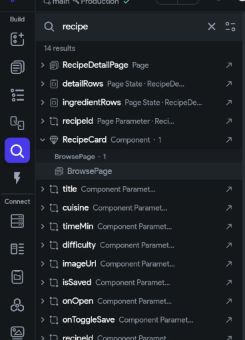
Project search: Search across your project, see where items are used, and jump directly to the relevant property or variable.
Find a component and navigate to where it is used.
Undo, redo, and edit history: Access undo and redo from the toolbar and return to earlier edits through a history menu that describes what changed.
Widget activity: See who last edited a widget from the canvas. Project activity now includes clearer change descriptions.
Remembered widget-tree state: Keep expanded branches, scroll position, and selection when switching between pages and components.
Canvas breadcrumbs: Navigate back through nested components from the breadcrumb at the bottom of the canvas.
Clipboard history: Reuse items copied during your session from the command palette.
Improved multiselection: Select widget ranges in the tree and see clearer highlights and selection labels.
Easier design generation: Access Designer generation and Figma imports from the Widgets panel and command palette. Pasting from Designer automatically creates a restore point.
Simpler value entry: Enter fixed dates with a date/time picker and build lists directly in property settings.
Actions and app behavior
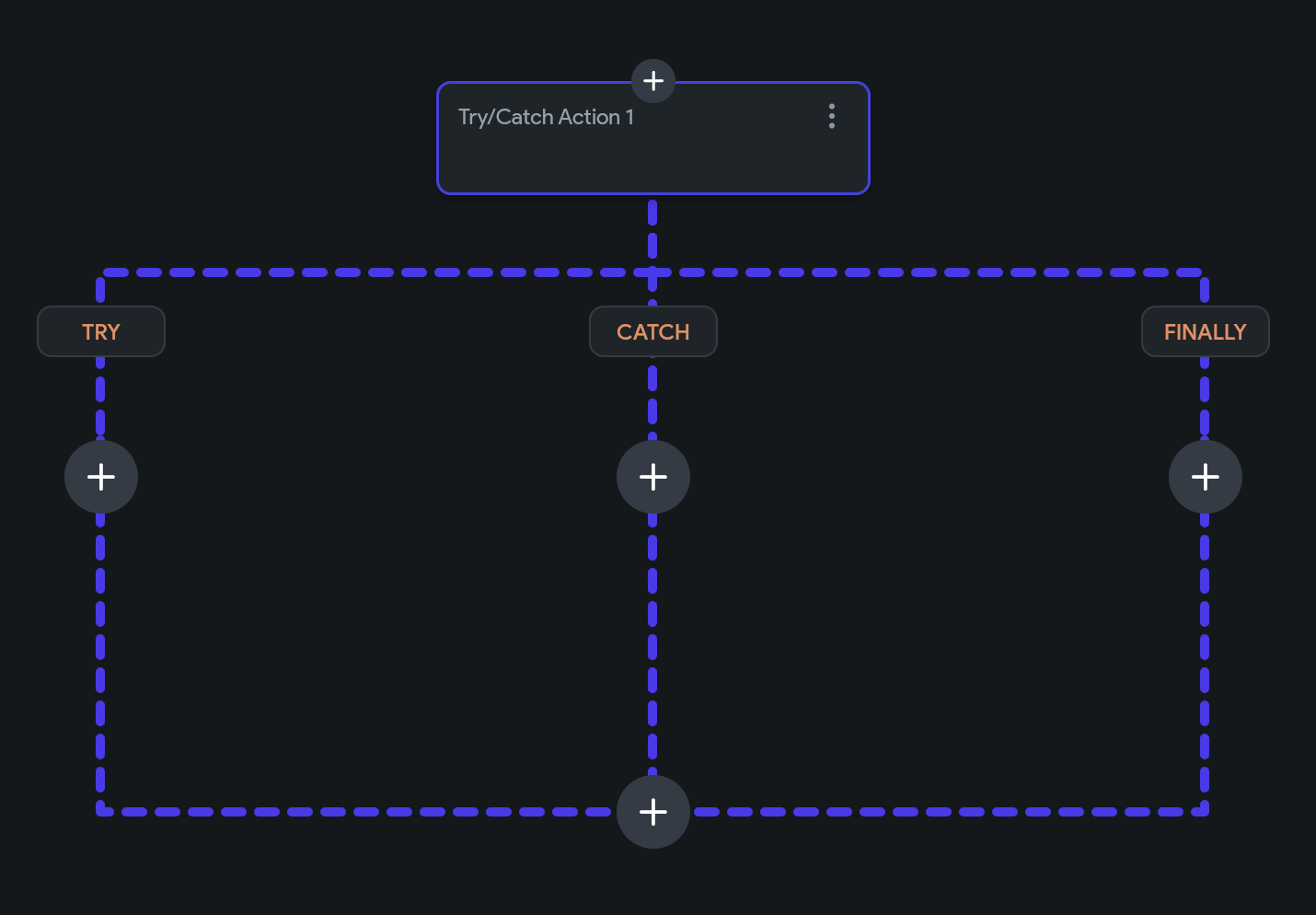
Try / Catch / Finally: Handle errors with native action blocks, access error messages and stack traces, and run cleanup actions in the Finally branch.
Handle errors and cleanup with dedicated Try, Catch, and Finally branches.
Debug Log action: Print messages and variable values to the debug console without writing a custom action. Logs are excluded from release builds unless you opt in.
Advanced scrolling: Scroll to specific items, start at the end, customize scroll physics, and respond to scroll events. ListViews expose scroll position, direction, and visible item indexes, and Scroll To accepts variable targets in pixels or percentages.
Custom route observers: Connect navigation events to analytics and monitoring tools through custom code.
Data and backend integrations
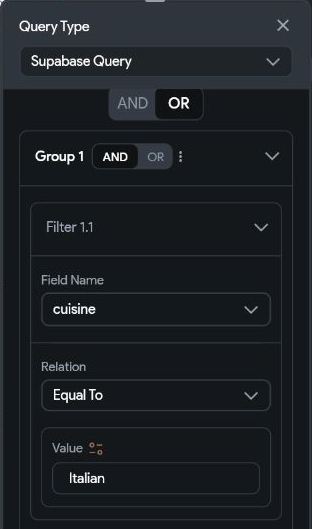
Grouped query filters: Combine AND/OR groups in Firestore and Supabase queries to express conditions such as “Italian recipes ready in 30 minutes or less, or any easy recipe.”
Combine AND conditions inside an OR group.
Infinite scrolling: Load Supabase and Postgres query results a page at a time as users scroll.
Firestore schema renaming: Rename collections and fields from the Database tab, with guidance for projects that already have live data.
Web push notifications: Enable Firebase push notifications for published web apps and PWAs.
Clearer deployment errors: Get actionable Firebase deployment details, including file and line information when custom Cloud Functions fail to load.
Widgets and styling
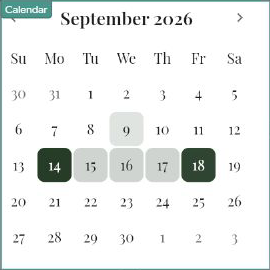
Modern Calendar: Choose a Modern calendar style with date-range selection, range highlighting, and booked dates that cannot be selected. Existing calendars retain their Material style.
Select and highlight a date range in the Modern Calendar.
Custom map markers: Populate Google Maps markers from data type lists and use different images for individual markers.
SVG tinting: Apply colors to SVGs in Image and Circle Image widgets.
Platform-specific app names: Configure separate package names and display names for Android and iOS.
Git package dependencies: Add validated Git package dependencies, including through the FlutterFlow AI SDK.
AI Agent
More agent providers: Use Gemini and Antigravity alongside Claude and Codex.
Concurrent conversations: Run several conversations at once and inspect work delegated to subagents. Long runs of file reads and commands collapse into expandable summaries.
Saved permission rules: Save approval rules for individual projects or all projects.
Asset uploads: Let agents upload images, fonts, animations, and shaders directly into your project.
Local Windows validation: Validate projects locally on Windows through the FlutterFlow AI CLI.
Bug fixes
Editor and project reliability
Reliable saving for large edits: Fixed large custom-code edits disappearing after reload despite appearing saved.
Accurate unsaved-change prompts: Removed discard-changes prompts when no edits were made.
Branch and merge recovery: Fixed stuck commits and merges blocked by “File is referenced but is empty” errors. Merge errors now identify and navigate to affected files.
Preserved variable bindings: Fixed the variable picker silently removing parts of existing bindings when their operations were temporarily unavailable.
Development-environment deletion: Fixed deletion being blocked by a different environment’s Firebase connection.
Crashlytics documentation: Fixed the broken documentation link.
Actions, widgets, and queries
Action-flow pasting: Fixed variable references in copied action chains and pasting into empty flows.
AI-generated loops: Fixed loops missing their actions or failing to read fields from the current item.
Firestore query indexes: Fixed missing composite indexes for grouped queries with range comparisons across multiple fields.
Google Maps configuration: Fixed data type marker selection, incorrect marker-count settings, and iOS location-permission generation. New maps now show the user’s location only when Show Location is enabled.
Widget expansion: Fixed expansion for component child-widget parameters and enabled full-screen expansion for Circle Images.
Image fallback settings: Fixed blur-hash and error-image variable bindings and prevented invalid blur hashes from breaking images. Reapply previously configured variable bindings for these toggles to activate the fix.
Authentication, builds, and deployment
iOS phone authentication: Fixed generated phone-authentication setup for apps without app push notifications enabled, and prevented crashes when verifying an unsent code. Phone authentication still requires the Apple Push Notifications capability and an APNs key in Firebase.
Push-notification deployment: Fixed upgrades of older push-notification functions for Firestore databases outside us-central1.
Web publishing: Fixed failures in projects with deeply nested action chains.
Test Mode and Firebase settings: Fixed gateway timeouts during slow Test Mode startup and a blank Firebase settings page.
Android Maps builds: Fixed build failures caused by special characters in Google Maps API keys.
Algolia compatibility: Fixed code-download and app-startup failures when combining Algolia with library dependencies.
Package dependency formatting: Fixed malformed custom dependencies and preserved quoted Git references in generated configuration.
Windows installation: Fixed installations and updates failing silently when administrator permissions were needed.
AI Agent reliability
Conversation recovery: Improved recovery from large-file failures, interrupted processes, and dropped Codex tool connections.
Codex skill discovery: Installed skills now appear in the command picker and run when selected.
Permission updates: Saved permission rules now take effect from the next message.
Claude Code on Windows: Fixed support for installations through npm.
Database field compatibility: Fixed CLI failures caused by database field names such as key, length, and map.
Background-process cleanup: Stopped agent processes from lingering after conversations or the app closed.
Billing
Subscription details: Fixed missing or failed plan and billing information, including when the billing provider is busy.
Team price estimates: Fixed estimates hanging for users on paid personal plans without a team subscription.
Firebase migration notice
Legacy Firebase connections: Connections using firebase@flutterflow.io Editor access are deprecated. New legacy connections are available until October 14, 2026, and legacy access ends on October 28, 2026.