The rebuilt Storyboard runs on an infinite canvas and shows which widget triggers each navigation. RevenueCat adds paywall, customer, and subscription actions, and Search can find and replace variables, colors, and fonts. This release also adds Data Type folders, Test Mode device frames, pub.dev package search, and Child Widget parameters for custom widgets. In total, this release includes 22 features and improvements and 18 bug fixes.
Features and improvements
Storyboard
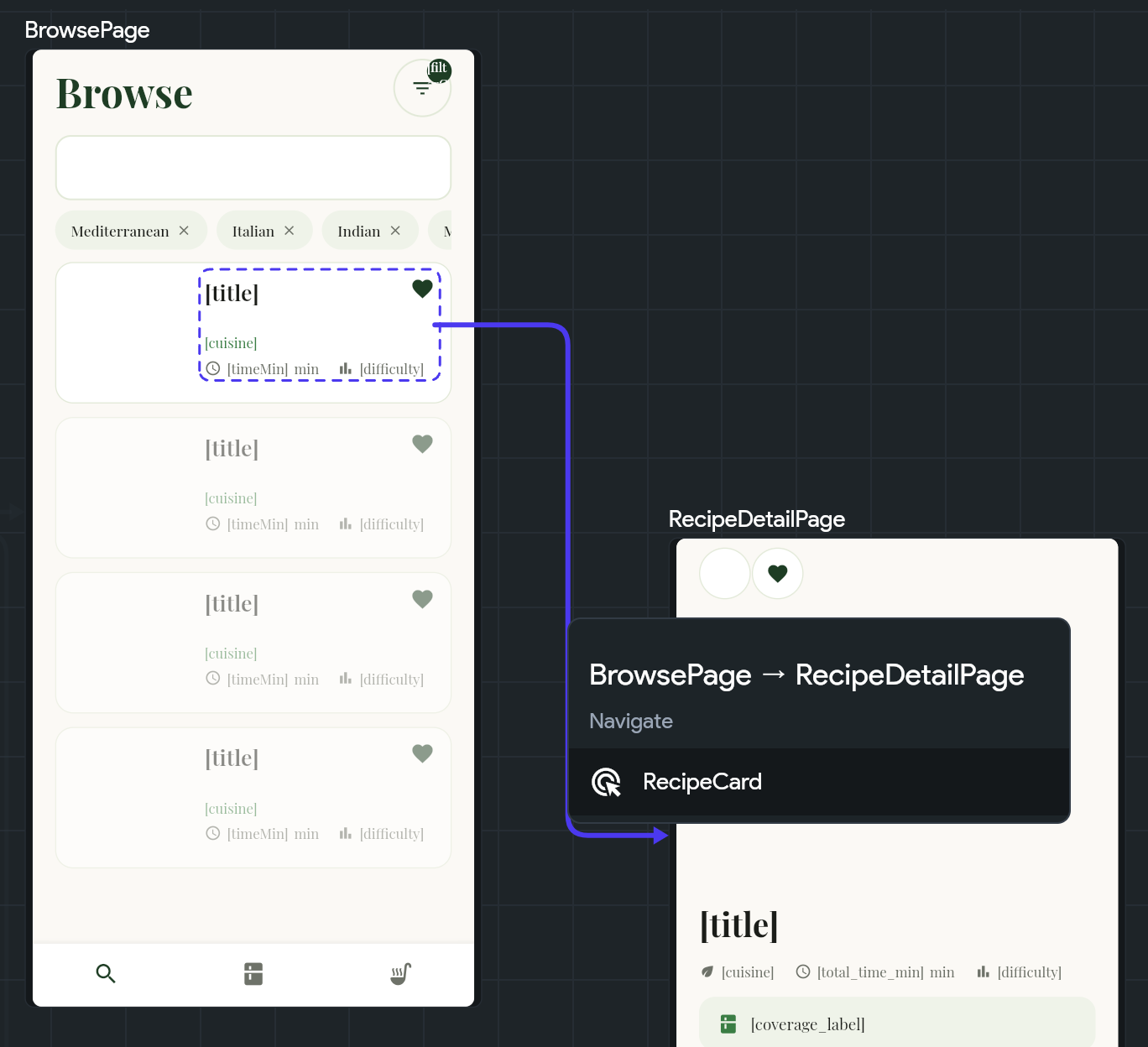
Rebuilt Storyboard: The Storyboard runs on an infinite canvas with pan and zoom, auto-arrange, focus mode, and a minimap. Each navigation arrow starts at the widget that triggers it. Click an arrow to see its trigger and go to that action. Pages and components that nothing links to stay hidden until you show them from the View menu. The Storyboard saves your page arrangement for each project.
Click an arrow to see the widget that triggers the navigation.
Editor and project organization
Find and replace: Replace App State and App Constant usages from the Search panel, bind hardcoded colors and fonts to your theme, and find hardcoded values by hex code or font name. Select individual usages or all of them, preview the change, and replace in one step.
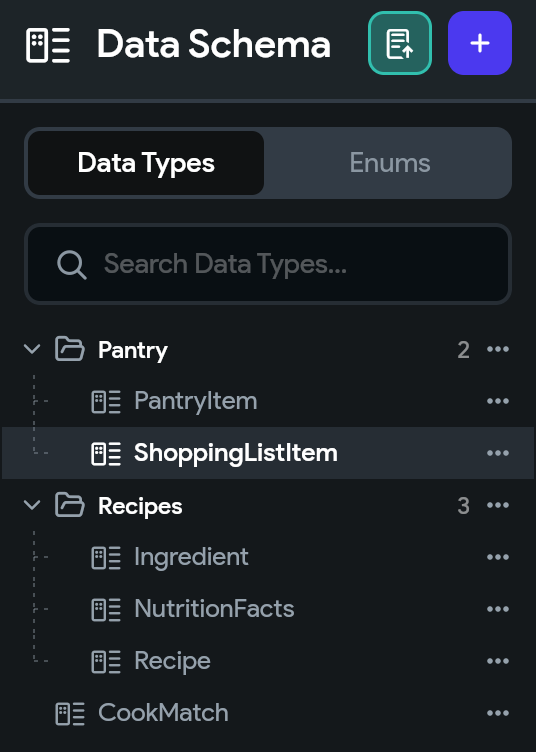
Data Type folders: Organize Data Types into folders on the Data Schema page. Generated code uses the same folder structure.
Group related Data Types into folders.
Move backend queries down: Move a backend query down to a child widget, or up to a parent. If a widget would lose its data source, the move menu warns you first.
Nav Bar settings: Add, reorder, and customize Nav Bar pages in Nav Bar settings, and create a custom Nav Bar component that's already connected to those pages.
Searchable API groups: The Move to API Group menu scrolls and has a search field, so you can reach every group.
Widgets
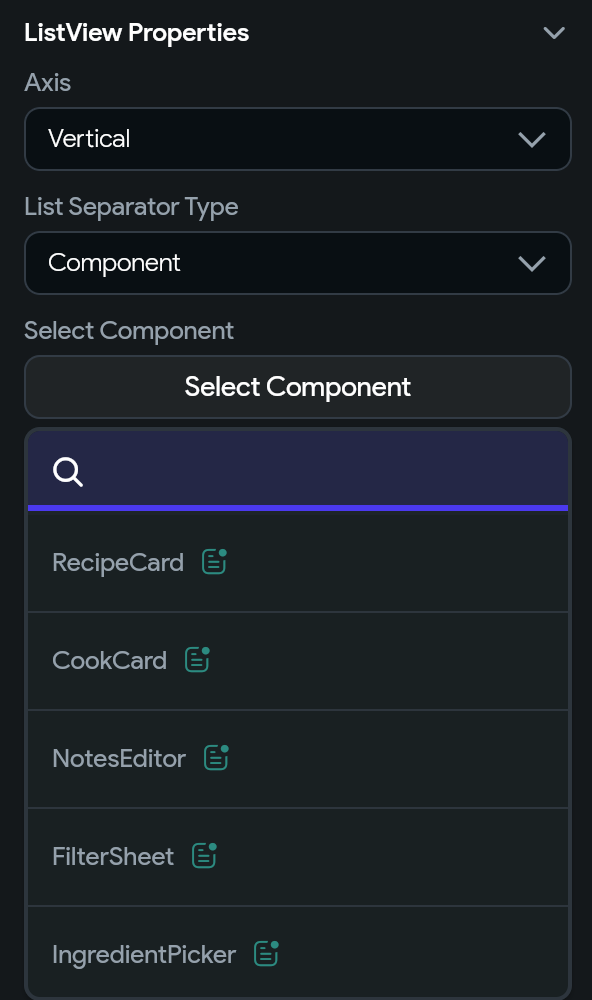
ListView separators: Use a component as the separator between ListView items, like ListView.separated in Flutter.
Choose a component to place between ListView items.
Built-in enums: Use built-in enums for Main Axis Size, Main Axis Alignment, Cross Axis Alignment, Keyboard Type, and Scroll Direction in state variables, parameters, and custom code. Widget properties can bind to them.
SwitchListTile inactive colors: Set Inactive Thumb Color and Inactive Track Color on SwitchListTile, including colors for the disabled state.
GenUI Chat model selection: Choose the Gemini model for a GenUI Chat widget in the AI Model property, or enter a custom model ID.
RevenueCat
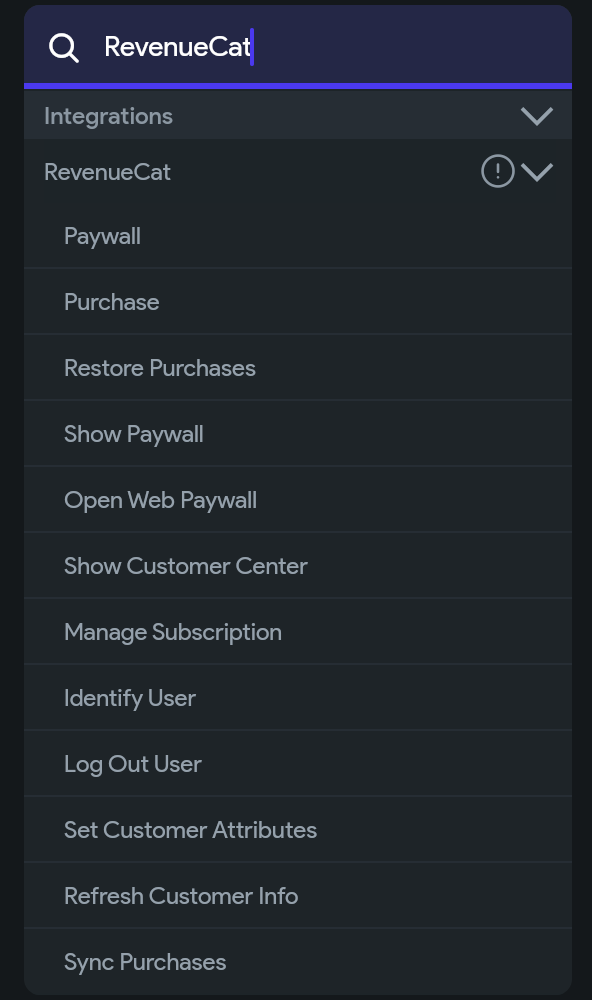
Paywalls and subscriptions: Use the Show Paywall, Show Customer Center, Open Web Paywall, Identify User, Log Out User, Set Customer Attributes, Refresh Customer Info, Sync Purchases, and Manage Subscription actions.
RevenueCat actions in the action picker.
Customer data: The Customer Info, All Offerings, App User ID, and Has Active Subscription variables expose customer, entitlement, and pricing details.
Web purchases: To support purchases on web, add a Web Paywall Link in RevenueCat settings.
Test Mode
Device frames: Preview your app in device frames with safe areas that match the selected device and orientation. You can hide the frames, or use a custom size without a frame.
Responsive previews: Device previews resize to fit the available space. Zoom in or out, and click Fit to return to the fitted size.
Loading screen videos: While Test Mode starts, the loading screen shows recent videos from the FlutterFlow YouTube channel. To watch a video in your browser, click its thumbnail.
Custom code and app configuration
Child Widget parameters: Custom widgets can take a Child Widget parameter. Drop any FlutterFlow widget into that slot from the widget tree.
MainActivity.kt and Podfile: Edit your Android MainActivity.kt file and iOS Podfile from Custom Code, and compare any unlocked configuration file with the version that FlutterFlow generates.
pub.dev search: When you add a custom pub dependency, search pub.dev by name and pick a version.
Custom deep link handling: If your app handles deep links with Branch, AppsFlyer, or app_links, turn on Disable Flutter's Built-In Deep Link Handling in Advanced Route Settings. You don't need to unlock AndroidManifest.xml or Info.plist to do this.
Deployment and AI Agent
Build failure logs: Mobile deployment build logs open at the step that failed. In FlutterFlow Desktop, click Fix with AI to send the failure to the AI Agent.
Responsive layout checks: AI agents connected to FlutterFlow Desktop can switch the canvas between phone, tablet, desktop, and custom sizes and take a screenshot of each. To check a layout at every breakpoint, ask the agent.
Bug fixes
Editor and data
No more blank Storyboard: If your project doesn't link its pages together yet, the Storyboard opens with your initial page instead of an empty canvas. If the app uses sign-in, the sign-in and logged-in pages also appear. When other pages are hidden, the Storyboard lists what's hidden, with buttons to show it.
Widget tree indicators: Widget tree icons update as soon as a widget gains or loses a backend query, generator variable, action, or animation.
Moved queries: A Refresh Database Request action follows its query when you move the query to another widget.
Data Type values: When you edit a Data Type value, every field appears, including fields whose Data Type or enum is missing.
Native Data Type lists: Nested lists of Data Types from private API calls and Cloud Function calls show their data in mobile and desktop builds, not only in Test Mode.
Supabase RPC: RPC input arguments sync for projects that revoke public function execution. To pick up the arguments, run Get Schema again. If an action references a deleted Postgres function, a project error appears that you can click to go to the action.
Firestore CSV import: The Number of Rows to Upload field appears, apostrophes in your data don't break quoted values, and large files upload without timing out.
Combine Text: Combine Text bindings show their rows instead of a blank gray box.
Custom code editor: The code editor keeps its scroll position when you open a page and return to a code file.
Widgets
Animated map markers: Animated GIF marker icons animate on Android and iOS.
SwitchListTile on iOS:Active Thumb Color applies to adaptive switches on iOS.
Range calendars: A range calendar opens on the month of its Initial Date instead of the current month.
GenUI Chat: GenUI Chat works in new projects instead of failing on a retired Gemini model.
Projects, Firebase, and Desktop
Development environments: When you connect a Firebase project to a non-production development environment, the connection succeeds and stays with that environment instead of attaching to production.
Project transfers: When you transfer a project to someone whose only paid plan is a Team plan, the project goes to their team instead of failing with a project-limit error.
Desktop disk usage: FlutterFlow Desktop stores one copy of its analyzer files instead of a duplicate for every project you open.
AI Agent
Codex recovery: When the Codex process exits, Codex conversations recover instead of hanging or failing with an unexplained "Internal error". Your next message starts a new process in the same conversation, and error messages explain what went wrong.
Branch merges: When you merge branches from FlutterFlow AI, the merge doesn't report dropped edits for files that neither branch changed, and it removes files that it deletes from the target branch.
Notices
GenUI Chat and Gemini 2.5: Gemini 2.5 Flash shuts down on October 16, 2026. GenUI Chat widgets without a selected model use a supported default, but only after you redeploy the app. If your app uses GenUI Chat, redeploy it before October 16, 2026.
Legacy Firebase connections: We moved the deprecation dates for firebase@flutterflow.io Editor access. You can create legacy connections until October 7, 2026, and legacy access ends on October 22, 2026.