Open the widget tree while your app runs in Test Mode, watch the AI Agent tick off its plan as it works, and keep the agent on the branch that you have open. Generated apps move to current Firebase SDKs, and support for the retired Firebase Dynamic Links service is removed. In total, this release includes 11 features and improvements and 33 bug fixes.
Features and improvements
Test Mode
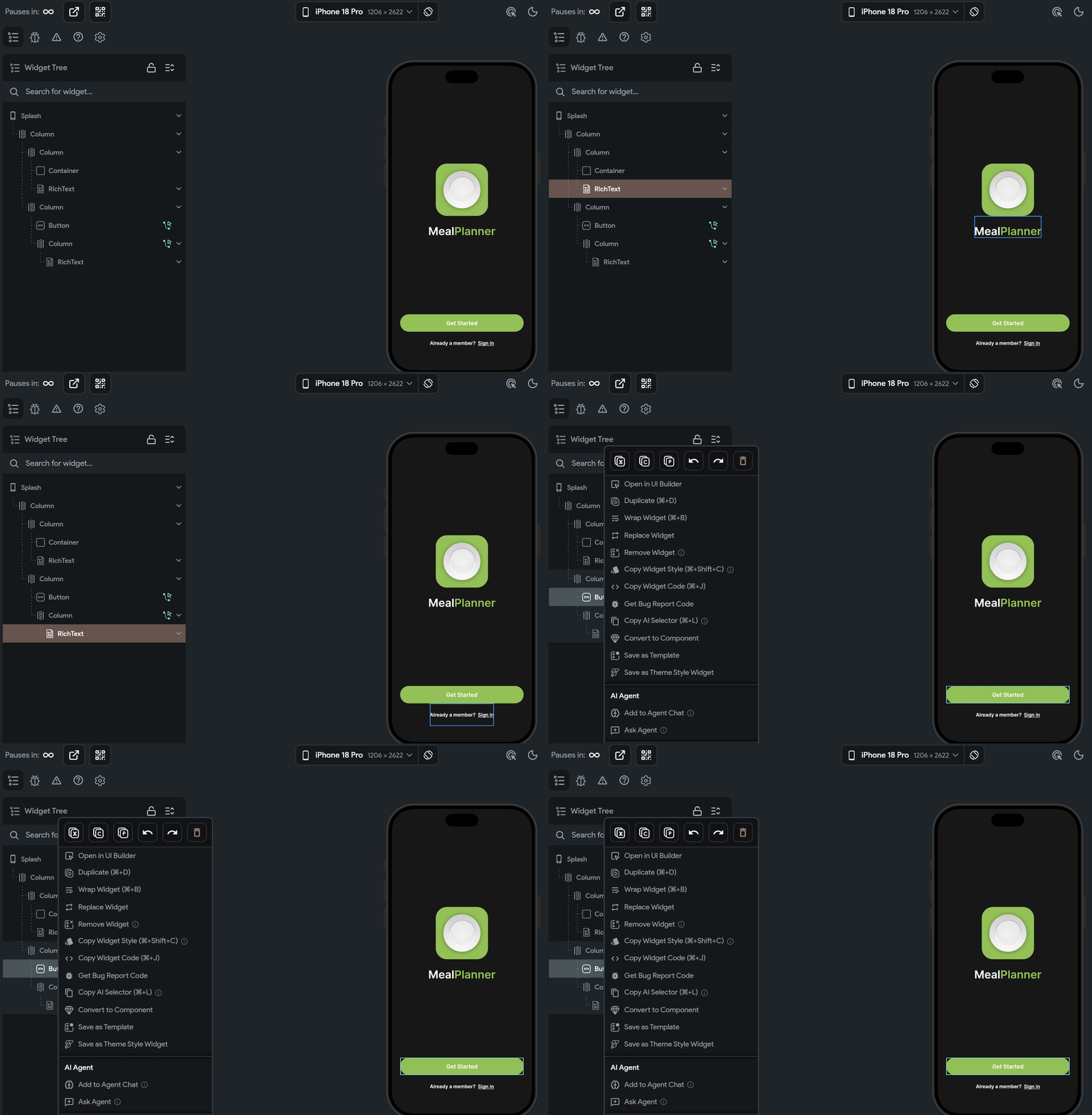
Widget tree: Open the widget tree while your app runs in Test Mode. It shows only the widgets on screen and highlights each one as you hover over it. Right-click a widget in the tree or in the app to get the full UI Builder widget menu.
Hover a widget in the tree to find it in your running app.
AI Agent
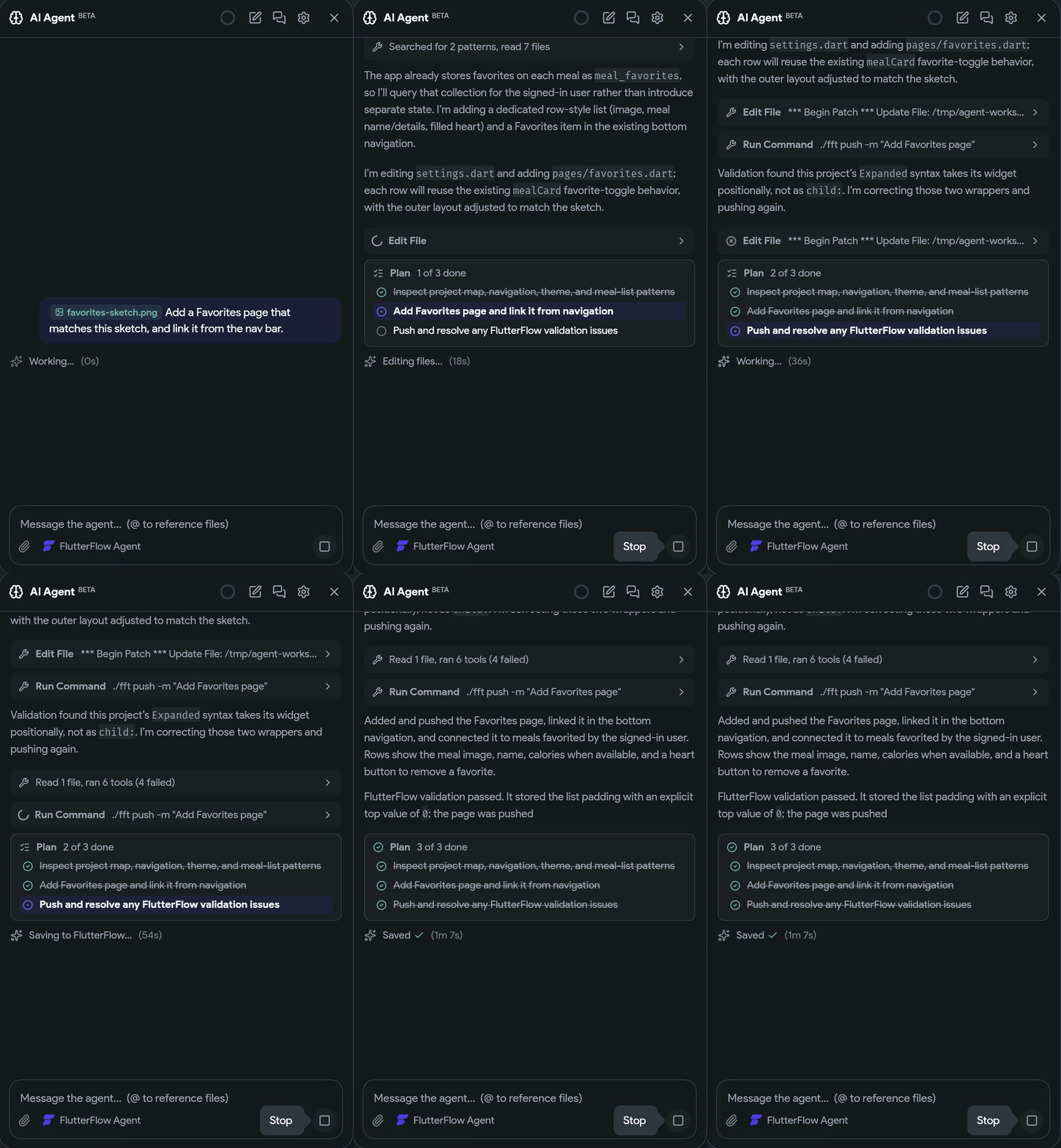
Plan and progress: The AI Agent panel shows the agent's plan as a checklist that it ticks off as it works, and a short status line says what it's doing right now, such as Writing pages/home_page.dart… or Saving to FlutterFlow….
Your open branch: The agent works on the branch that you have open. If it wants a different branch, it asks you first, and if you switch branches, the conversation comes with you. In a workspace that the editor manages, the agent asks the editor to switch instead of moving the workspace off your branch.
Activity logs on request: Ask the agent for a project's activity logs over a specific time range to find out what changed. It uses the read access that you already have to the project.
Follow the plan and the current step while the agent works.
Activity log
Clearer entries: Activity entries have clearer descriptions, show where each edit came from, and label undo and redo.
Agent edits: The activity log shows which page and widget an AI SDK or agent edit changed, the same as for edits made in the editor.
Firebase
Current Firebase SDKs: Generated apps use current Firebase SDKs. When you upgrade a project or import a library, older Firebase versions in its custom dependencies are updated automatically.
Email changes: After a Firebase email change, the new address syncs once it's verified and the user signs in or their session refreshes. The Update Email action explains these steps.
Builds and editor
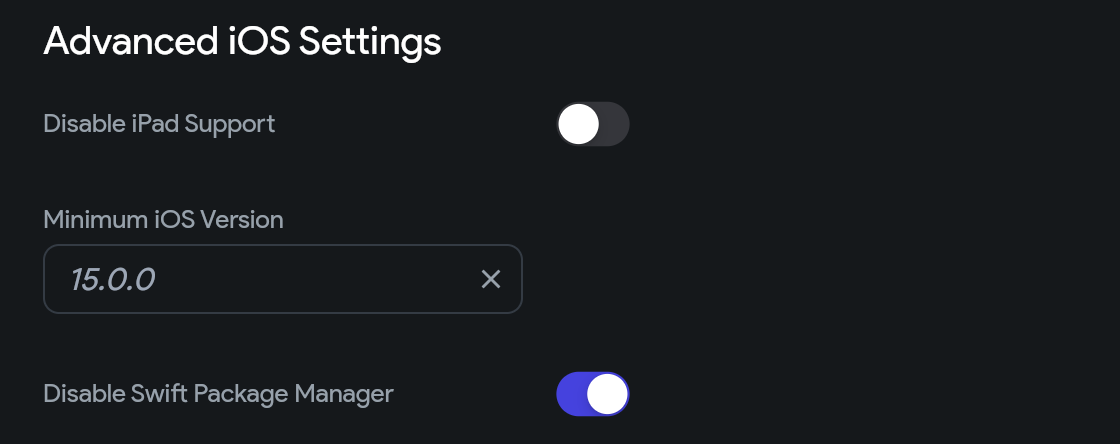
Disable Swift Package Manager: Turn on Disable Swift Package Manager in Advanced iOS Settings to install every iOS and macOS plugin with CocoaPods instead.
Ordinary deep links: Switch existing Generate Current Page Link actions to ordinary deep links without turning on FlutterFlow Dynamic Links.
Large projects: Opening and editing large projects uses much less memory.
Install iOS and macOS plugins with CocoaPods instead.
Bug fixes
Builds and Test Mode
Supabase lists in App State: App State fields of type List<Supabase Row> no longer break the build with "undefined class" errors when the list is updated.
Animations: Animations created without an easing curve build and run in Test Mode.
Android edge to edge:Use Edge to Edge draws apps behind the navigation bar on Android 10 to 14, not only on Android 15 and later.
Project errors with Action Blocks: Project errors show again when an app-level Action Block uses a Semantics Announce or Cancel Streaming Response Subscription action, instead of showing no errors while code export fails.
Custom Class Queries: Custom Class Queries no longer show misleading warnings about duplicate backend queries.
Generated code
Custom code: Custom class method calls can leave out optional arguments and use their declared defaults, and custom class constructors are valid when non-null arguments are bound to page or component state. Enhanced custom enum methods and dependency-backed static values resolve correctly in action flows.
App State and data: File App State values handle empty defaults and nullable assignments, and clearing a securely stored App State value removes it without writing the default back. Toggling a boolean field on a data type item inside a nested list generates correct code.
Widgets: Text respects line heights bound to variables, including when the value changes while the app runs. Tabs can switch between top and bottom placement using a variable, password visibility toggles keep keyboard focus, and line chart axis labels keep special characters.
Pages and libraries: App bars with page-level responsive visibility generate valid code and still follow the project's App Bar visibility settings. Pages that use enum parameters from a library get the route imports they need, and library list parameters keep their list types.
Lottie and shaders: Lottie animations with dynamic initial playback and restart controls generate valid code, and Lottie controllers are cleaned up when you leave a page during a controlled one-shot animation. Animated shader backgrounds build, including when no shader parameters are set.
Dropdowns: Dropdowns can use enum values for literal options and initial selections without false validation errors.
Environment values: Public environment strings that contain dollar signs load correctly in exported apps.
Firebase apps: Firebase apps build when they have an enum named Type or custom widgets that use Flutter action maps, and with compatible older sharing, storage, image editing, and geolocation packages.
Tooltips: Generated integration tests can find and tap controls by their tooltip text.
Desktop app and AI Agent
macOS code editor: On the macOS desktop app, the custom code editor no longer slides out of view after you preview a custom widget.
Signing in to Claude: Signing in to Claude from the AI Agent panel no longer gets stuck on Opening your browser… with current Claude Code versions.
Reopening a conversation: If your last conversation can't be reopened, the AI Agent panel starts a new chat instead of opening on a finished setup screen. A conversation that fails to open from the list says why.
Workspace setup: If AI Agent workspace setup fails without reporting an error, the panel says so, and the exported diagnostics log includes the setup output.
AI SDK edits: Checkbox labels bound to variables display in apps built with the AI SDK, and agent edits that call a Supabase Edge Function find the function when the app is built.
Notices
Firebase Dynamic Links removed: Support for the retired Firebase Dynamic Links service has been removed. The editor shows guidance for setting up replacement links.
geoflutterfire2: geoflutterfire2 2.3.15 integrations keep working with the upgraded Firebase dependencies. Other geoflutterfire2 setups may need to be updated or replaced before they build.